IntelliJ IDEA Notes
An IntelliJ IDEA troubleshooting reference for indexing, Maven variables, Lombok, framework support, imports, and serialVersionUID.
Cannot resolve symbol
Choose File → Invalidate Caches / Restart to clear caches and rebuild indexes. This can take a while. If it does not help, find IntelliJ’s cache directory, delete it, and try again.
I encountered a bug after updating Maven’s settings.xml. A simplified pom.xml looked like:
<build> <filters> <filter>src/main/filters/filter-${env}.properties</filter> </filters></build><profiles> <profile> <id>dev</id> <properties> <env>dev</env> <doc-enable>true</doc-enable> </properties> </profile></profiles>IntelliJ reported that env could not be resolved, even though the project compiled and ran. Moving profiles before build removed the error; moving it back did not restore the error. I could reproduce it after updating settings.xml and reimporting dependencies.
IntelliJ IDEA 2016.3.4, build IU-163.12024.16
Note: Maven Helper may have caused this behavior.
Lombok annotations such as @Getter are not recognized
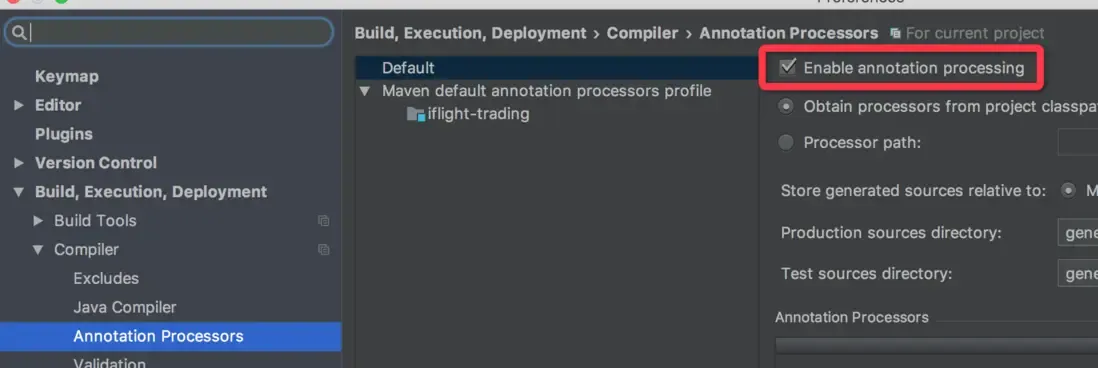
Open Preferences, search for annotation, and enable annotation processing as shown:
Convert another project into a Maven project
Add the appropriate framework support when opening the project, or right-click the project and choose Add Framework Support.
Optimize and remove unused imports
Press Command+Option+O.
Generate serialVersionUID
Place the cursor on the class name, press Option+Enter, and choose the corresponding action.
